
We have not tested these products. This comparison is reasoned from manufacturer specifications, documentation and warranty terms. How we test
If you buy through a link on this page we may earn a commission. Retailers do not pay for reviews or placement. Prices are shown as bands, never as figures — the live price is at the retailer. As an Amazon Associate I earn from qualifying purchases. How we make money
On this page
Video memory is the least glamorous number on a graphics card and the one most likely to decide when you replace it. It is also the one specification you cannot change afterwards.
The requirement, by resolution
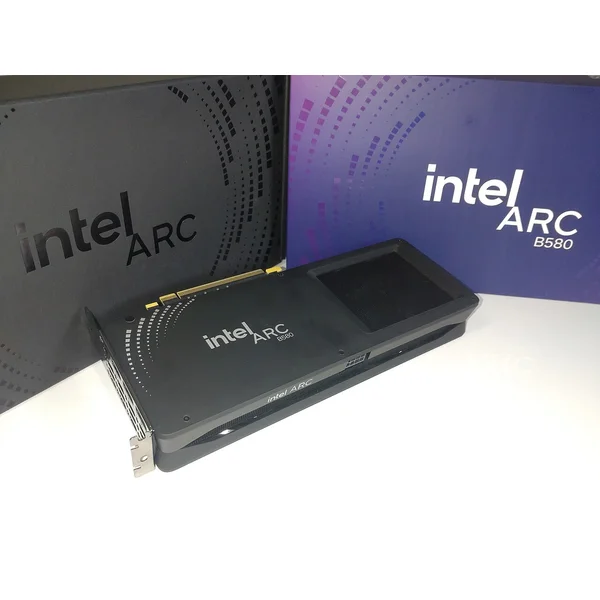
1080p. Eight gigabytes still works today at high settings in most titles. Twelve is what makes the card comfortable for several years rather than adequate for two — the Intel Arc B580 (at Amazon, opens in a new tab) is a card built around exactly that trade.
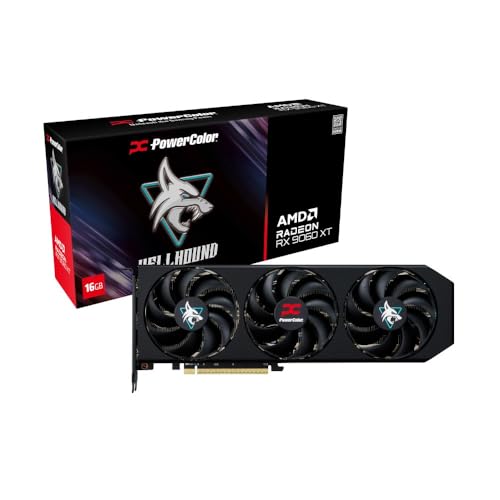
1440p. Twelve is the sensible floor for a card bought now. Sixteen is what you want if you keep hardware for four years or more, or if you use ray tracing — the Radeon RX 9060 XT 16GB (at Amazon, opens in a new tab) buys that headroom without stepping up a tier on price. Our 1440p graphics card picks are chosen with that floor in mind.
4K. Sixteen, and the cards that drive 4K properly all have it anyway. The question rarely arises at this resolution because the cards capable of it are not sold with thin memory.
Add headroom on top of all of these if you run ray tracing, if you play at high texture settings — and you should, because texture quality is nearly free — or if you keep a browser with forty tabs open behind the game.
Why shortage behaves so strangely
A card short of shader performance is slow, evenly and predictably. A card short of memory is mostly fine and occasionally terrible, because it is swapping assets across a connection far slower than its own memory whenever the scene changes faster than it can keep up.
That pattern is why average frame rates are such a poor guide here, and why a card can review well at launch and become unpleasant two years later without anything about it having changed except the games.
For the rest of what a card needs to fit and run well, see our graphics card buying guide, and for cards at the lower end of the price range specifically, our roundup of the best budget graphics cards.
The naming problem
Several ranges now sell two cards with the same model name and different memory capacities. The price difference is small; the difference in useful life is not. Read the capacity on the product page rather than trusting the model number, and be sceptical of a listing that omits it.
How we reached this
These figures come from published memory capacities, from how graphics hardware behaves when it exhausts local memory, and from the resolutions and settings these cards are marketed to run. We have not measured memory usage across a suite of games ourselves, and the tier list links to laboratories that publish results of that kind.
Free tool PC Build Compatibility Checker — Will your GPU, PSU, cooler and case actually fit together?What we recommend
 (opens Amazon in a new tab)
 - Band
- $$ Mid tier
Radeon RX 9060 XT 16GB
The cheapest way to buy memory headroom rather than borrow it from the future.
- Sixteen gigabytes far below the usual price for it
- Low power draw and a small physical footprint
- Current-generation upscaling and media features
- An eight-gigabyte card shares the same model name
- Memory bus limits it before capacity ever does
- Band
- $ Budget tier
Intel Arc B580
Twelve gigabytes on a wide bus, at a price the established vendors do not match.
- Capacity and bus width are both unusual at this price
- Handles high texture settings without complaint
- Modern video encoding included
- Driver maturity trails the two established vendors
- Wants a reasonably modern platform underneath it
Questions people ask
What happens when a card runs out of video memory?
It does not slow down evenly, which is what makes the problem so confusing when you meet it. The card starts moving data between video memory and system memory across a comparatively slow connection, and the result is stutter: momentary freezes and hitches while assets are swapped in. An average frame rate can look entirely healthy while this is happening, which is why benchmark charts often fail to reveal the problem and why people conclude a card is fine right up until they play it.
Does ray tracing use more VRAM?
Yes, noticeably. Ray tracing requires the card to hold a structure describing the scene geometry in addition to everything it already needed, and that structure grows with scene complexity. Frame generation adds its own requirement on top. This is why a card can have enough memory for a game at high settings and run short the moment ray tracing is switched on, and it is a large part of why entry-level cards with ray-tracing marketing struggle to actually use it.
Can I add more VRAM later?
No. Video memory is soldered to the board and there is no upgrade path, which is exactly why the figure deserves more attention at purchase than almost anything else on the specification sheet. Everything else about a build can be improved incrementally: you can add system memory, swap a drive, replace a cooler. The memory on a graphics card is fixed for the life of the card, so it is the one number where buying headroom you do not yet need is a rational decision.

