
We have not tested these products. This comparison is reasoned from manufacturer specifications, documentation and warranty terms. How we test
If you buy through a link on this page we may earn a commission. Retailers do not pay for reviews or placement. Prices are shown as bands, never as figures — the live price is at the retailer. As an Amazon Associate I earn from qualifying purchases. How we make money
On this page
Most graphics card advice is a ranking. This is not one — our GPU tier list handles that. This is what to check before you commit, in the order that actually matters.
Start with the monitor, not the card
The resolution and refresh rate of the screen you own determine which band of card is sensible, and buying outside that band wastes money in one direction or disappoints in the other. A card built for 4K in a 1080p machine is money that should have gone to the monitor. A card built for 1080p driving a 1440p high-refresh panel will not deliver what the panel was bought for. For the most common case, our picks for 1440p gaming apply the checks below to current cards.
If you are buying both at once, resolve the monitor first. It will outlast two graphics cards.
The specifications in the order they matter
Memory capacity. The figure that decides how long the card stays pleasant to own, for reasons covered in depth in our guide to how much video memory you need.
Memory bandwidth. Capacity without bandwidth is a card that has room for the textures and cannot move them fast enough. Watch for generous capacity paired with a narrow bus at the lower end of every range.
Shader performance. What most people think they are buying. It matters, and it degrades gracefully, which is why it is third.
Software features. Upscaling quality, frame generation, and video encoding. These are no longer equivalent between vendors and they are a legitimate part of the decision, particularly if you stream or edit video.
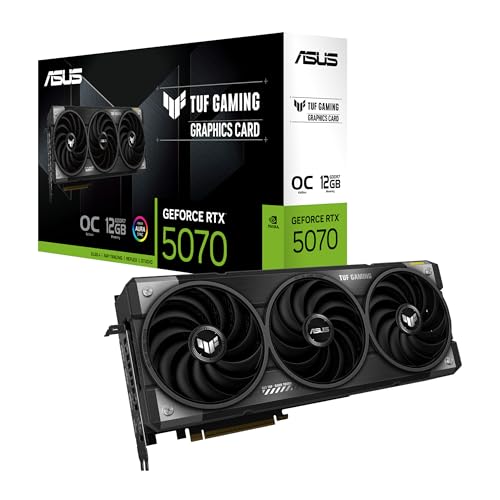
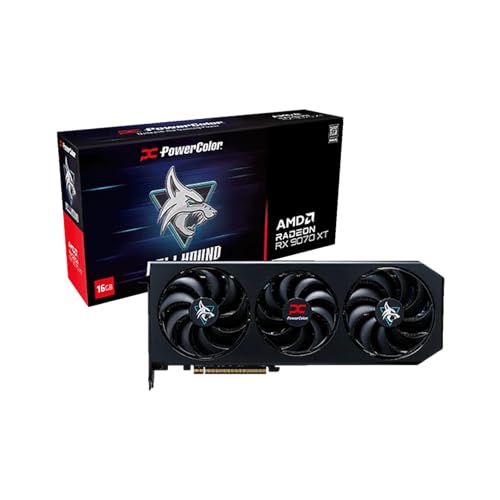
Two cards worth weighing against each other at this stage of the search are the GeForce RTX 5070 (at Amazon, opens in a new tab) and the Radeon RX 9070 XT (at Amazon, opens in a new tab): they sit close enough in price that the checks above, rather than brand habit, are what should decide between them.
The checks people skip
Physical length, slot thickness, and power connector, in that order. Then the age of the power supply, which matters independently of its rating.
What we can and cannot tell you
We have not tested these cards. This guide is built on published specifications and on the physical and electrical constraints of a real build, and where a number matters we have said where to find an independently measured version of it. The compatibility checker linked below will do the fit and power arithmetic against the rest of your parts.
Free tool PC Build Compatibility Checker — Will your GPU, PSU, cooler and case actually fit together?What we recommend
 (opens Amazon in a new tab)
 - Band
- $$ Mid tier
GeForce RTX 5070
A sensible default for a 1440p build if the memory figure suits how long you keep hardware.
- Comfortable at the resolution most people actually use
- Modest power draw and physical size for its class
- The most mature upscaling and encoding software
- Memory capacity is the specification that dates it
- Rivals offer more raw rasterisation for the money
 (opens Amazon in a new tab)
 - Band
- $$$ Upper-mid tier
Radeon RX 9070 XT
More memory and more rasterisation for the money, now with ray tracing worth using.
- Sixteen gigabytes where rivals ship twelve
- Ray tracing finally competitive this generation
- Strong rasterisation performance per pound
- Professional and AI tooling still favours the competition
- Higher board power than the nearest rival
Questions people ask
Which specification matters most?
Memory capacity, then memory bandwidth, then everything else. Shader performance decides your frame rate today and degrades gracefully as games get heavier, so a card that is slightly too slow just means turning a setting down. Running short of video memory does not behave that way: it produces stutter and hitching that an average frame rate hides completely. Capacity is what decides how long a card stays pleasant to own, which is why it belongs at the top of the list rather than buried under the marketing.
Will the card physically fit my case?
Check three measurements before you order: length, which is the one people get wrong; thickness in expansion slots, because triple-slot coolers are now normal and will block whatever sits below them; and clearance to the drive cage or front radiator at the end of the card. Your case manufacturer publishes a maximum graphics card length and it is usually accurate. Our compatibility checker will compare a card against a case for you rather than making you find both numbers yourself.
Do I need to worry about the power connector?
Yes, and more than you used to. Recent high-end cards use a connector that older supplies do not have, and the adapter that ships in the box is a fallback rather than a recommendation. What matters is the continuous rating on the twelve-volt rail rather than the number on the front of the supply, the presence of the right native connector, and enough headroom above the combined draw of card and processor at full load. An underpowered supply shows up as shutdowns under load, not as a system that refuses to start.
