
We have not tested these products. This comparison is reasoned from manufacturer specifications, documentation and warranty terms. How we test
If you buy through a link on this page we may earn a commission. Retailers do not pay for reviews or placement. Prices are shown as bands, never as figures — the live price is at the retailer. As an Amazon Associate I earn from qualifying purchases. How we make money
On this page
The short version
The speed and timing combination the current mainstream platform is happiest with.
See at Amazon — G.Skill Flare X5 DDR5-6000 (opens in a new tab)Widely stocked, widely validated, and available in whichever capacity you need.
See at Amazon — Corsair Vengeance DDR5 (opens in a new tab)The cheap kit that still runs its rated speed without an argument.
See at Amazon — TeamGroup T-Force Vulcan DDR5 (opens in a new tab)Memory is a short decision that people spend a long time on. Capacity first, a sensible speed second, timings a distant third, and everything else is lighting.
Capacity is the decision
Thirty-two gigabytes is the comfortable answer for a machine built today. Sixteen still works for games alone and is starting to feel tight the moment anything else is open, which for most people is always. The Corsair Vengeance DDR5 (at Amazon, opens in a new tab) covers that capacity in whichever speed your board wants, and the TeamGroup T-Force Vulcan DDR5 (at Amazon, opens in a new tab) gets there for less if the graphics card needs the difference more.
Beyond thirty-two, you are buying for a workload rather than for games, and you will know if you have one. Our RAM sizing guide walks through that decision in more depth.
Speed, with one caveat that undoes people
Every platform has a speed it is designed around, where the memory controller runs in its most efficient mode. Going beyond that point produces smaller gains and more instability. Buy the platform sweet spot rather than the highest number on the shelf — the G.Skill Flare X5 (at Amazon, opens in a new tab) is tuned to exactly that target on the current mainstream platform.
Two sticks, not four
Two modules give you the dual-channel arrangement the platform expects, put less load on the memory controller, and leave you two free slots. Four modules are harder to run fast and remove your upgrade route entirely.
How we chose
No memory was benchmarked here. This guide rests on published speeds and timings, platform design targets as documented by the processor manufacturers, physical height against common coolers, and board validation lists. Our motherboard buying guide and gaming motherboard roundup cover choosing the board itself.
Free tool PC Build Compatibility Checker — Will your GPU, PSU, cooler and case actually fit together?The picks
 (opens Amazon in a new tab)
 - Band
- $$ Mid tier
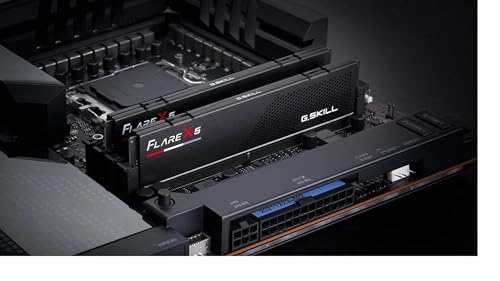
G.Skill Flare X5 DDR5-6000
The speed and timing combination the current mainstream platform is happiest with.
- Tuned for the sweet spot of the current platform
- Low profile clears tall processor coolers
- Reliable one-switch configuration
- Plain appearance with no lighting
- Not the highest raw speed available
 (opens Amazon in a new tab)
 - Band
- $$ Mid tier
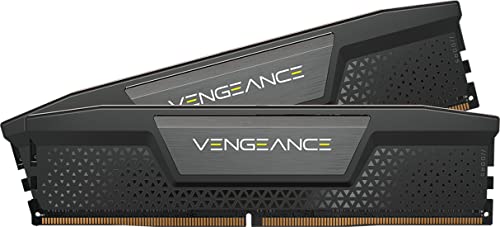
Corsair Vengeance DDR5
Widely stocked, widely validated, and available in whichever capacity you need.
- Validated against a very wide range of boards
- Available in most capacities and speeds
- Consistently available and frequently discounted
- Taller than low-profile alternatives
- Timings are looser than enthusiast kits
 (opens Amazon in a new tab)
 - Band
- $ Budget tier
TeamGroup T-Force Vulcan DDR5
The cheap kit that still runs its rated speed without an argument.
- Cheapest route to a sensible capacity and speed
- Runs its advertised profile without fuss
- Low profile suits big coolers and small cases
- Loose timings compared with premium kits
- Narrower board validation list
Questions people ask
Do I need to enable the memory profile?
Yes, and this is the most commonly skipped step in a build. Memory ships running at a conservative baseline speed defined by the standard, not at the speed printed on the package, and it stays there until you switch on the profile in the firmware. It is one setting, it takes about thirty seconds, and without it you have paid for fast memory and are running slow memory. Check it after every firmware update too, because some updates reset it.
How much does memory speed affect frame rate?
Measurably but modestly, and much more on some platforms than others. Moving from the baseline speed to a sensible enthusiast speed is worth a real if small improvement, especially in games that are limited by the processor rather than the graphics card. Moving from a sensible speed to the very fastest kit available is worth very little and costs a great deal. Buy the speed the platform is designed around and spend the rest elsewhere.
Should I buy two sticks or four?
Two, in almost every case. Two modules run in the dual-channel arrangement the platform is designed for and put less strain on the memory controller, so they are more likely to reach their rated speed reliably. Four modules can be harder to run at high speed, and if you later want more memory you have no free slots and must replace everything. Buy the capacity you want as two sticks and leave the other two slots empty.
G.Skill Flare X5 DDR5-6000
The speed and timing combination the current mainstream platform is happiest with.