

We have not tested these products. This comparison is reasoned from manufacturer specifications, documentation and warranty terms. How we test
If you buy through a link on this page we may earn a commission. Retailers do not pay for reviews or placement. Prices are shown as bands, never as figures — the live price is at the retailer. As an Amazon Associate I earn from qualifying purchases. How we make money
On this page
The short version
The vertical case: neutral forearm rotation, and you can still use it on day one.
See at Amazon — Logitech Lift (opens in a new tab)The trackball case: the device never moves, so neither does your arm.
See at Amazon — Logitech MX Ergo (opens in a new tab)These are frequently presented as two versions of the same idea. They are not: one changes your hand’s angle, the other removes arm movement altogether.
What each one actually changes
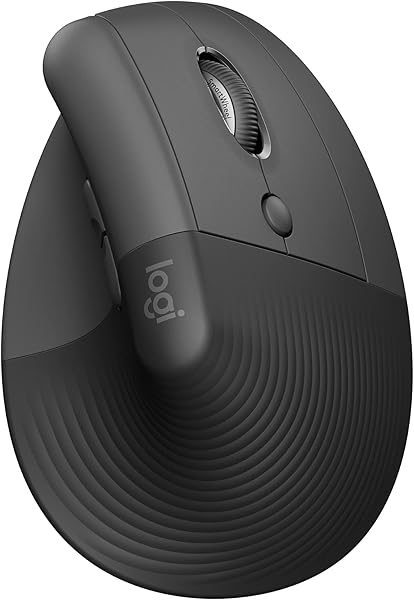
Vertical mouse. Rotates your hand to a handshake position, reducing forearm pronation. Your arm still moves the device across the desk exactly as before. The Logitech Lift (at Amazon, opens in a new tab) is a common example of this shape, and our vertical mouse roundup covers others.
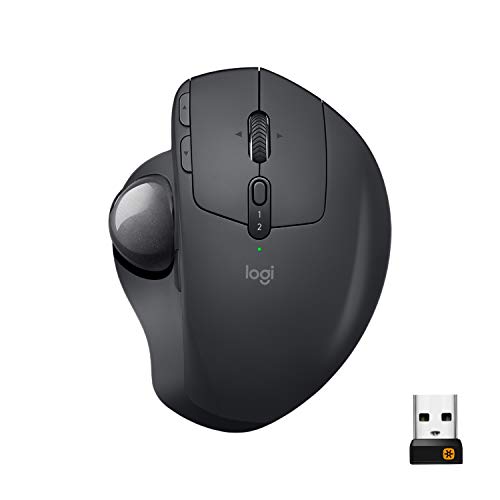
Trackball. The device stays still and your thumb or fingers move the ball. Arm and shoulder travel drops to essentially zero. Your hand angle is roughly conventional, or tilted on some models. The MX Ergo (at Amazon, opens in a new tab) adds a tilting base on top of this — see our full review for where it works and where it does not.
They address different joints, which is why “which is better” has no general answer. Fit matters for both, and our ergonomic mouse picks start with measuring your hand.
Choose by where it hurts
- Forearm ache, rotation discomfort → vertical mouse
- Shoulder ache, discomfort from reaching and travel → trackball
- Thumb or finger problems already → be cautious with a thumb trackball, and consider a finger-operated one instead
The desk-space difference
A trackball has a fixed footprint and needs no clearance to move. On a genuinely small desk, or on a lap, or in an armchair, that is a decisive practical advantage that has nothing to do with ergonomics.
Adaptation
The vertical mouse takes a few days. A trackball takes one to two weeks to feel natural and longer for precision work. That difference should factor into the decision if you cannot afford a slow week.
The picks
 (opens Amazon in a new tab)
 - Band
- $$ Mid tier
Logitech Lift
The vertical case: neutral forearm rotation, and you can still use it on day one.
- Neutral handshake position
- No relearning required
- Works on any surface with a mat
- Still needs desk space to move
- Does not reduce arm travel
 (opens Amazon in a new tab)
 - Band
- $$ Mid tier
Logitech MX Ergo
The trackball case: the device never moves, so neither does your arm.
- Zero arm movement required
- Fixed footprint on tiny desks
- Adjustable tilt angle
- Real adaptation period
- Ball needs occasional cleaning
Questions people ask
Which is better for RSI?
Neither is categorically better, because they address different mechanisms. A vertical mouse reduces forearm rotation but you still move your whole arm. A trackball eliminates arm movement but concentrates work into the thumb or fingers. If your discomfort is in the shoulder or comes from repeated travel, the trackball addresses it. If it is forearm rotation, the vertical mouse does. Moving the problem to a different joint is not always an improvement.
Are trackballs slower?
After adaptation, most users reach comparable speed for general work. Precision tasks — detailed design, CAD, competitive gaming — are where trackballs remain genuinely harder, because fine control with a thumb is less practised than fine control with the whole arm. For ordinary office work, speed is not a good reason to avoid one.