
We have not tested these products. This comparison is reasoned from manufacturer specifications, documentation and warranty terms. How we test
If you buy through a link on this page we may earn a commission. Retailers do not pay for reviews or placement. Prices are shown as bands, never as figures — the live price is at the retailer. As an Amazon Associate I earn from qualifying purchases. How we make money
On this page
The short version
The gas-spring arm that holds position for years instead of drooping after six months.
See at Amazon — Ergotron LX Desk Mount (opens in a new tab)The same basic geometry for a fraction of the price, with a shorter service life.
See at Amazon — Amazon Basics Single Monitor Arm (opens in a new tab)A weight-compensating spring arm rated from 6 to 28 lb, wide enough for heavy panels.
See at Amazon — Humanscale M8.1 (opens in a new tab)A monitor arm solves one problem, and it solves it completely: it puts the screen where your neck wants it rather than where the factory stand happens to reach. That is the whole value proposition, and it is why an arm is usually a better first purchase than a new chair.
What actually matters in a monitor arm
Three specifications decide whether an arm works for you, and the rest is noise.
Weight range, not weight capacity. Every arm advertises a maximum. The number that matters is the minimum. A gas spring tuned for a heavy panel cannot be loosened enough to hold a light one — it will drift upward and stay there. Check that your screen sits inside the range, not merely under the ceiling. A heavy ultrawide is where the mechanical spring of the Humanscale M8.1 (at Amazon, opens in a new tab) stops being overkill.
Clamp thickness. Most clamps accept a desk edge up to about 60 mm. Thicker tops, and desks with a lip or a rounded front edge, need the grommet mount and therefore a hole in the desk. The step-by-step installation guide covers when each mount applies.
Spring type. Gas springs are cheaper and lighter. Mechanical springs cost more and do not fade. On a five-year horizon the mechanical arm is usually the better purchase; on a two-year horizon the Amazon Basics Single Monitor Arm (at Amazon, opens in a new tab) is the reasonable buy instead.
Between those two sits the arm most people should own. The Ergotron LX Desk Mount (at Amazon, opens in a new tab) is the gas spring that holds its position for years rather than months, and the LX review covers the weight floor that catches people out.
Height is the point
Set the top of the usable screen area at or slightly below seated eye level, and push the panel back until it is roughly an arm’s length away. If you wear progressive lenses, go lower — you read through the bottom of the lens, and a high screen forces your chin up all day. The monitor height guide has the varifocal exception in full. Position is half of screen comfort; brightness, contrast and the other monitor settings are the other half.
How we chose
We compared published load ranges, mount options and warranty terms across the category, and weighted long-term position holding heavily because it is the failure mode owners report most often. We have not disassembled these arms or run them through a fatigue rig, and this guide says so rather than implying a test programme that does not exist.
The picks
 (opens Amazon in a new tab)
 - Weight capacity
- 3.2-11.3 kg
- Max screen size
- 34 in
- Mount type
- Clamp or grommet
- Band
- $$ Mid tier
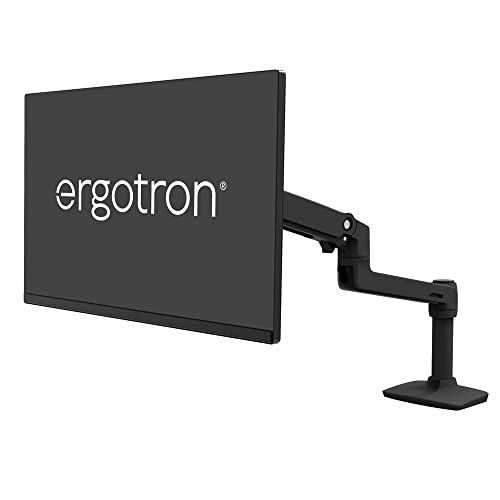
Ergotron LX Desk Mount
The gas-spring arm that holds position for years instead of drooping after six months.
- Holds position without re-tensioning
- Fits the widest range of desks
- Long warranty covering the gas spring
- Tension floor is too high for very light screens
- Clamp needs a reasonably thin desk edge
 (opens Amazon in a new tab)
 - Weight capacity
- 2.3-11.3 kg
- Max screen size
- 32 in
- Mount type
- Clamp or grommet
- Band
- $ Budget tier
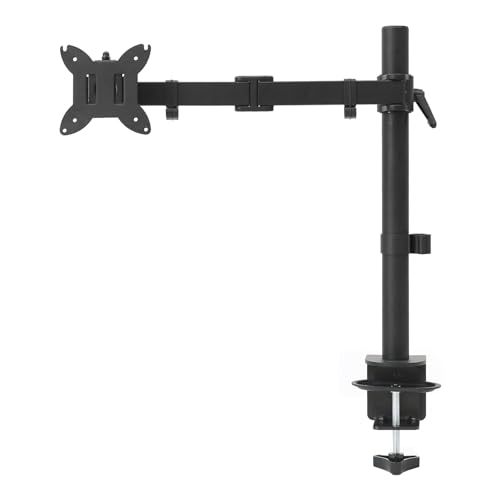
Amazon Basics Single Monitor Arm
The same basic geometry for a fraction of the price, with a shorter service life.
- Lowest cost per mount point
- Handles lighter screens the Ergotron cannot
- Clamp and grommet both included
- Gas spring loosens over time
- Short warranty
 (opens Amazon in a new tab)
 - Band
- $$$$ Premium tier
Humanscale M8.1
A weight-compensating spring arm rated from 6 to 28 lb, wide enough for heavy panels.
- Wide 6 to 28 lb load range
- Mechanical spring does not fade
- Quick-release joints for simple assembly
- Substantially more expensive
- Overkill for a single 27-inch screen
Questions people ask
Does a monitor arm actually help with neck pain?
It helps by making one specific thing possible: putting the top of the screen at or just below eye level, roughly an arm's length away. Most stock monitor stands cannot reach that height. The arm is not therapeutic in itself; it removes the constraint that forces you to look down all day.
Will a monitor arm damage my desk?
A clamp mount concentrates load on a small area of the desk edge. On solid wood, steel or a good laminate this is fine. On hollow-core or thin particleboard, use the grommet mount instead, or place a metal plate under the clamp to spread the load.
How do I know if my monitor is VESA compatible?
Look for four screw holes in a square on the back of the panel, 75 mm or 100 mm apart. That is VESA 75x75 or 100x100, which covers nearly every arm on the market. Some thin or curved panels need a manufacturer-specific adapter plate.
Ergotron LX Desk Mount
The gas-spring arm that holds position for years instead of drooping after six months.