
We have not tested these products. This comparison is reasoned from manufacturer specifications, documentation and warranty terms. How we test
If you buy through a link on this page we may earn a commission. Retailers do not pay for reviews or placement. Prices are shown as bands, never as figures — the live price is at the retailer. As an Amazon Associate I earn from qualifying purchases. How we make money
On this page
The short version
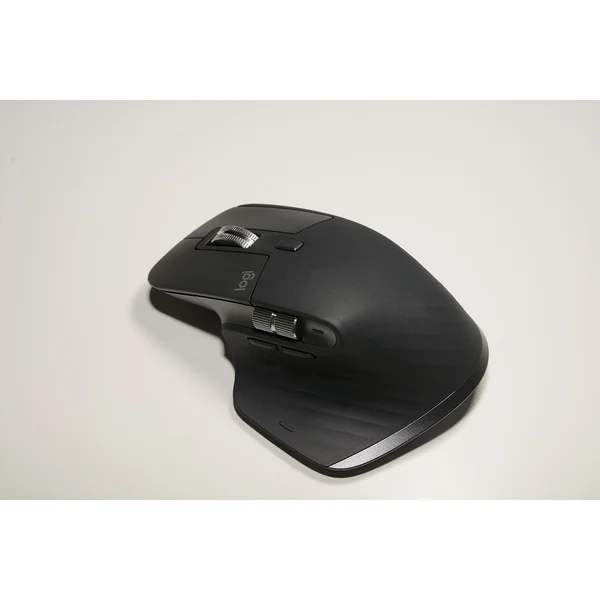
A large sculpted shape that supports the whole hand rather than the fingertips.
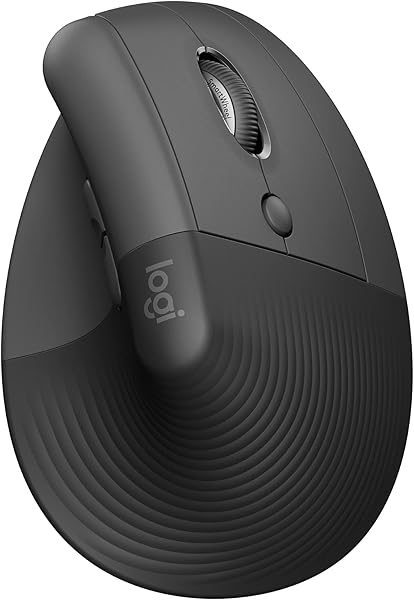
See at Amazon — Logitech MX Master 3S (opens in a new tab)A vertical shape in a smaller body, which is the combination that is usually missing.
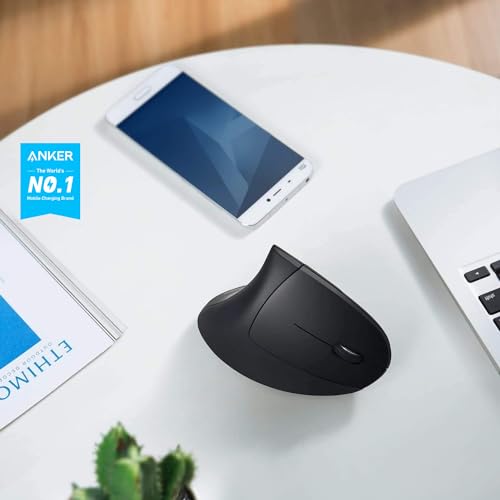
See at Amazon — Logitech Lift (opens in a new tab)The cheapest honest way to find out whether a vertical grip suits you.
See at Amazon — Anker Vertical Ergonomic Mouse (opens in a new tab)Mouse ergonomics is mostly about two things: whether the mouse fits your hand, and whether it forces your forearm to rotate. Almost everything else is preference.
Size is the variable people get wrong
Measure your hand from the heel of the palm to the tip of the middle finger. Under 17 cm is small, 17 to 19 cm medium, above 19 cm large.
A mouse too small for your hand forces a claw grip — fingers arched, palm unsupported, hand held in continuous low-level tension. That grip is a substantial source of fatigue and it is entirely a sizing problem.
Most mice are designed around a medium hand, which is why people with large hands so often find a full-size mouse such as the Logitech MX Master 3S (at Amazon, opens in a new tab) a revelation.
Grip style follows from size
- Palm grip — whole hand rests on the mouse, movement from the arm. The least tense grip, needs a mouse that fits.
- Claw grip — fingers arched, back of the palm touching. Faster for small movements, more tension.
- Fingertip grip — only fingertips touch. Most precise, most tension.
If you use a claw grip because your mouse is too small, a bigger mouse will change your grip and reduce the tension. If you use a claw grip by choice for precision, that is a different situation.
The rotation question
A conventional mouse requires your palm to face downward, which means your forearm bones cross — pronation. A vertical mouse holds your hand in a handshake position, which does not; the vertical mouse roundup goes into the sizing problem that category has.
The same rotation happens at the keyboard, where tenting on an ergonomic keyboard is the fix, and the split keyboard buying guide separates tenting from splitting. A trackball addresses a different problem, arm travel rather than rotation: the vertical mouse versus trackball comparison sorts out which one you have, and our MX Ergo review looks at a trackball with a tilting base.
Whether that matters depends on where your discomfort is. Forearm ache responds well to a vertical shape, and the Logitech Lift (at Amazon, opens in a new tab) is the one we recommend first. Fingertip and hand fatigue usually respond better to correct sizing. If you are unsure which describes you, the Anker Vertical Ergonomic Mouse (at Amazon, opens in a new tab) is the low-commitment way to find out.
The picks

- Band
- $$ Mid tier
Logitech MX Master 3S
A large sculpted shape that supports the whole hand rather than the fingertips.
- Supports the whole palm
- Thumb rest removes grip tension
- No adaptation required
- Too large for small hands
- Does not address forearm rotation
 (opens Amazon in a new tab)
 - Band
- $$ Mid tier
Logitech Lift
A vertical shape in a smaller body, which is the combination that is usually missing.
- Vertical angle in a smaller shell
- Quiet switches
- Multi-device switching
- Too small for large hands
- Fewer buttons than the Master
 (opens Amazon in a new tab)
 - Band
- $ Budget tier
Anker Vertical Ergonomic Mouse
The cheapest honest way to find out whether a vertical grip suits you.
- Very low cost
- Genuine vertical angle
- Widely available
- Basic sensor and build
- Buttons feel cheap
Questions people ask
How do I know what size mouse I need?
Measure your hand from the base of your palm to the tip of your middle finger. Under about 17 cm is small, 17 to 19 cm is medium, over 19 cm is large. Most people use a mouse too small for their hand, which forces a claw grip — fingers arched, palm unsupported — and that grip is a significant contributor to hand fatigue.
Does a high DPI setting reduce strain?
Indirectly, yes. Higher sensitivity means less physical movement to cross the screen, so less repeated arm and wrist travel. The trade-off is precision: too high and you overshoot constantly, which produces its own fine-motor tension. Turn it up until you can cross your whole screen without lifting the mouse, then stop.
Logitech MX Master 3S
A large sculpted shape that supports the whole hand rather than the fingertips.