
We have not tested these products. This comparison is reasoned from manufacturer specifications, documentation and warranty terms. How we test
If you buy through a link on this page we may earn a commission. Retailers do not pay for reviews or placement. Prices are shown as bands, never as figures — the live price is at the retailer. As an Amazon Associate I earn from qualifying purchases. How we make money
On this page
The short version
A fixed-focus lens and a large sensor, tuned for a person sitting at a desk.
See at Amazon — Elgato Facecam MK.2 (opens in a new tab)A gimbal-mounted camera that tracks you, which matters if you do not sit still.
See at Amazon — OBSBOT Tiny 2 (opens in a new tab)The dependable middle: good enough image, reliable software, no drama.
See at Amazon — Logitech Brio 500 (opens in a new tab)More camera than the price suggests, provided you put some light on your face.
See at Amazon — Anker PowerConf C200 (opens in a new tab)Webcams are limited by physics before they are limited by price. The sensor is small, the lens is small, and no processing fully compensates for either; a real camera is the only way past both.
What actually decides the picture
Light on your face. This is not the camera’s specification, and it is the single largest factor. A small sensor in a dim room amplifies noise; the same sensor with a soft light in front of it looks like a different product. That is the condition under which the Anker PowerConf C200 (at Amazon, opens in a new tab) earns its place. The Elgato Key Light review looks at a panel that clamps above the monitor, next to the camera.
Sensor size and aperture. The larger both are, the less amplification is needed. These are the specifications worth comparing, and they are the ones least prominently advertised. They are the reason the Elgato Facecam MK.2 (at Amazon, opens in a new tab) is our pick.
Resolution. Matters least. Most streams are delivered at 1080p or lower anyway.
Autofocus, which is not always a feature
A camera that refocuses mid-sentence because you moved your hands is worse than one with fixed focus at a sensible distance. If you sit at a consistent distance, fixed focus or manual focus is an advantage. If you move around instead, the OBSBOT Tiny 2 (at Amazon, opens in a new tab) is the one that follows you. A fixed seated position also suits keying against a green screen, where your distance from the screen decides how clean the edges are.
How we chose
No cameras were tested or compared side by side here. This guide rests on published sensor sizes, lens apertures, focus behaviour and connectivity, and on how each behaves against the lighting conditions of an ordinary room.
The picks
 (opens Amazon in a new tab)
 - Band
- $$$ Upper-mid tier
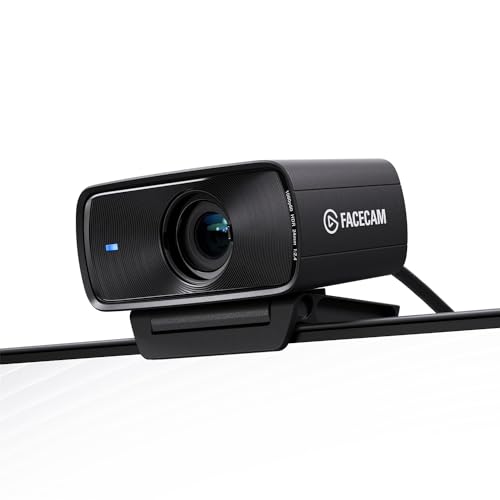
Elgato Facecam MK.2
A fixed-focus lens and a large sensor, tuned for a person sitting at a desk.
- Handles a dim room better than most webcams
- No autofocus hunting mid-sentence
- Full manual control over exposure and white balance
- Fixed focus means a fixed working distance
- No built-in microphone at all
 (opens Amazon in a new tab)
 - Band
- $$$$ Premium tier
OBSBOT Tiny 2
A gimbal-mounted camera that tracks you, which matters if you do not sit still.
- Physical tracking keeps you framed while you move
- Large sensor copes well with low light
- Gesture control genuinely works
- Costs several times a conventional webcam
- Moving parts are a long-term failure point
 (opens Amazon in a new tab)
 - Band
- $$ Mid tier
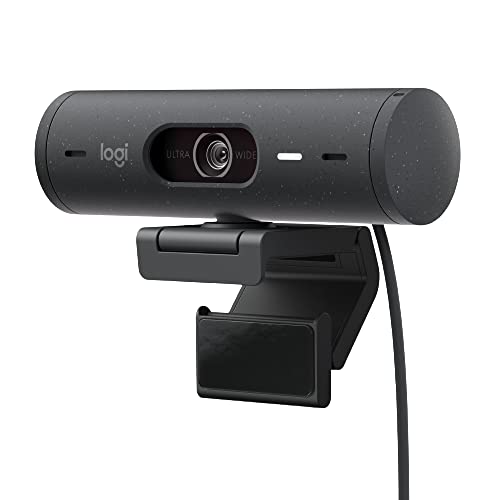
Logitech Brio 500
The dependable middle: good enough image, reliable software, no drama.
- Reliable across operating systems
- Physical privacy cover built in
- Useful framing and adjustment software
- Struggles in a dim room like most webcams
- Autofocus can hunt under some lighting
 (opens Amazon in a new tab)
 - Band
- $ Budget tier
Anker PowerConf C200
More camera than the price suggests, provided you put some light on your face.
- Adjustable field of view at a low price
- Decent image with adequate lighting
- Compact with a built-in privacy cover
- Noticeably noisy in low light
- Built-in microphone is not worth using
Questions people ask
Why does my webcam look grainy?
Almost always light rather than the camera. Webcam sensors are physically tiny, and a small sensor in a dim room has to amplify what little light it gathers, which amplifies noise along with the picture. Adding a single soft light in front of you will improve the image more than any upgrade within the category, because it lets the camera stop amplifying. This is why a cheap camera in good light beats an expensive one in the dark.
Is 4K worth it for streaming?
Rarely, because most platforms deliver at 1080p or below and your viewers will see a re-encoded version regardless. What a higher-resolution sensor does buy you is the option to crop into the frame without losing detail, which is genuinely useful if the camera is further away than you would like. Beyond that, the sensor size and the lens aperture matter far more to how the picture looks than the resolution number does.
Do I need a camera with a microphone?
No, and you should not use one even where it exists. A camera microphone sits at arm length or further and points at the whole room, which is the opposite of what good voice capture requires. Anything you buy for the purpose, including a very cheap dedicated microphone close to your mouth, will sound dramatically better. Treat a built-in camera microphone as an emergency fallback rather than part of the setup.
Elgato Facecam MK.2
A fixed-focus lens and a large sensor, tuned for a person sitting at a desk.