
We have not tested these products. This comparison is reasoned from manufacturer specifications, documentation and warranty terms. How we test
If you buy through a link on this page we may earn a commission. Retailers do not pay for reviews or placement. Prices are shown as bands, never as figures — the live price is at the retailer. As an Amazon Associate I earn from qualifying purchases. How we make money
On this page
The short version
Passes through at high refresh while capturing at a sensible resolution, with no drivers.
See at Amazon — Elgato Game Capture HD60 X (opens in a new tab)Captures at the resolution and rate you actually play at, which is the whole point of it.
See at Amazon — Elgato Game Capture 4K X (opens in a new tab)Enough for 1080p streaming, which is what most platforms deliver anyway.
See at Amazon — AVerMedia Live Gamer Mini (opens in a new tab)A capture card exists to get video from a device that is not your computer — a console, a second machine, or a real camera — into your computer, without ruining the experience on the device.
Two specifications, not one
Capture is what reaches your computer. Pass-through is what reaches your monitor.
These differ, often substantially, and the pass-through is the one that decides what your gameplay feels like. A card that captures at a modest resolution but passes through at your monitor’s full capability is the right trade for most people, because your viewers see a compressed stream anyway and you see the pass-through. That is the trade the Elgato Game Capture HD60 X (at Amazon, opens in a new tab) makes. The Elgato Game Capture 4K X (at Amazon, opens in a new tab) is the pick when the capture itself has to match what you play at, and the AVerMedia Live Gamer Mini (at Amazon, opens in a new tab) the one for a first card. Switching between that feed and the rest of your scenes is the job a stream deck or controller takes off the keyboard, and our Stream Deck MK.2 review looks at whether the larger model earns its price.
Where the latency goes
The captured path is delayed by buffering and encoding. That is normal and it is why you play on the pass-through; whether the card is internal or external changes that delay only slightly. Recording software keeps audio aligned with the delayed video, and problems here are almost always configuration rather than hardware.
How the voice on that recording sounds is a separate question from sync. A microphone held close on a boom arm does most of the work, and the rest is the room: how acoustic treatment works explains what the reflections are doing, and treating a room cheaply covers the free fixes first.
How we chose
No cards were tested or measured here. This guide rests on published capture and pass-through specifications, connection requirements, encoding provision and driver requirements.
The picks
 (opens Amazon in a new tab)
 - Band
- $$ Mid tier
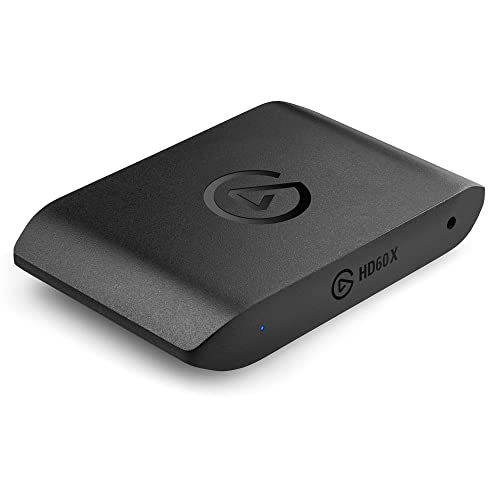
Elgato Game Capture HD60 X
Passes through at high refresh while capturing at a sensible resolution, with no drivers.
- Pass-through preserves high refresh rates for the player
- Works with no drivers on most systems
- Compact and powered from the same cable
- Captures below what it passes through
- External box and two more cables on the desk
 (opens Amazon in a new tab)
 - Band
- $$$$ Premium tier
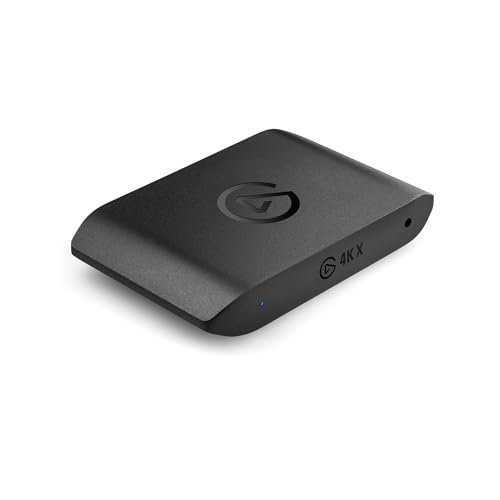
Elgato Game Capture 4K X
Captures at the resolution and rate you actually play at, which is the whole point of it.
- Captures at high resolution and high refresh
- Very generous pass-through capability
- Onboard encoding reduces load on the computer
- Costs several times the mainstream option
- Needs a fast connection to the computer
 (opens Amazon in a new tab)
 - Band
- $ Budget tier
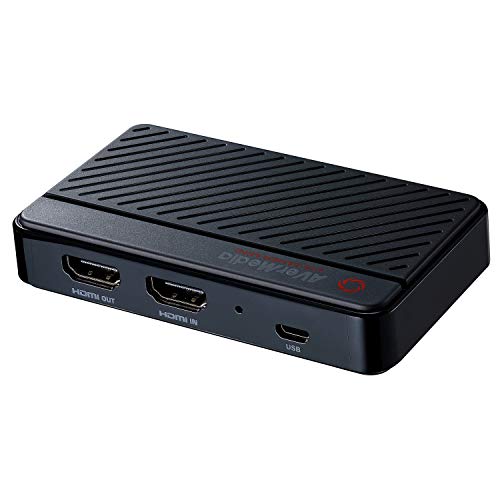
AVerMedia Live Gamer Mini
Enough for 1080p streaming, which is what most platforms deliver anyway.
- Cheapest route to capturing a console
- No drivers needed on most systems
- Small enough to leave permanently connected
- Pass-through limited to standard refresh rates
- Noticeably more capture latency
Questions people ask
What is pass-through and why does it matter?
The card takes the video from your console, sends a copy to the computer for capture, and sends the original onward to your monitor. That second path is the pass-through, and it matters because you play on it. If the card passes through at a lower refresh rate than your display supports, you have degraded your own experience in order to record. Check the pass-through specification against your monitor, not just the capture specification.
Do I need a second computer?
Not with a modern machine and a card that handles its own encoding. A single computer can play, capture and stream provided it has the headroom, and the graphics card encoders built into current hardware do this efficiently. A second machine becomes worthwhile when you are pushing the playing machine hard enough that encoding costs you frames, or when you want the stream to survive a game crashing.
Why is there a delay on the captured video?
Because capture involves buffering, encoding and transmitting, and each stage takes time. It is why you never play on the captured feed: you play on the pass-through, which is essentially instant, and let the delayed copy go to the recording. The delay itself is not a fault and cannot be eliminated. What matters is keeping your audio in sync with it, which recording software handles if you let it.
Elgato Game Capture HD60 X
Passes through at high refresh while capturing at a sensible resolution, with no drivers.