
We have not tested these products. This comparison is reasoned from manufacturer specifications, documentation and warranty terms. How we test
If you buy through a link on this page we may earn a commission. Retailers do not pay for reviews or placement. Prices are shown as bands, never as figures — the live price is at the retailer. As an Amazon Associate I earn from qualifying purchases. How we make money
On this page
The short version
Console-derived preamplifiers with the gain a low-output dynamic microphone actually needs.
See at Amazon — Audient iD4 MkII (opens in a new tab)Two inputs, very low latency, and metering you can actually read from across the desk.
See at Amazon — MOTU M2 (opens in a new tab)The default two-input interface, with a switch that solves the low-gain microphone problem.
See at Amazon — Focusrite Scarlett 2i2 (opens in a new tab)The one with a character switch that flatters a voice, if you want colour rather than neutrality.
See at Amazon — Solid State Logic SSL 2 (opens in a new tab)An interface does three things: it powers and amplifies your microphone, it converts the signal to digital, and it sends audio back to your headphones. Only the first is likely to limit you.
If you are still weighing a mixer against an interface, the interface-versus-mixer comparison settles which job you have. If you know it is an interface, what to look for in one comes down to four decisions.
Gain is the whole decision
Modern converters are good. Even inexpensive ones resolve more detail than your room or your microphone will ever supply. Condensers also need phantom power, but that is standard rather than a point of difference.
Preamplifiers are not equal. A quiet microphone into a weak preamplifier means turning everything to maximum and recording the preamplifier’s own noise alongside your voice. That hiss is in the file permanently. Once the pairing is right, setting recording levels takes thirty seconds.
This is why matching matters more than ranking: the same interface is excellent with a condenser and inadequate with a broadcast dynamic. It is also why the Audient iD4 MkII (at Amazon, opens in a new tab) leads this list, and why the Focusrite Scarlett 2i2 (at Amazon, opens in a new tab) is the two-input default; its single-input sibling, the Scarlett Solo, is reviewed separately, and the budget interfaces cover the cheaper end.
Latency, and when it matters
Round-trip latency is the delay between speaking and hearing yourself through the computer. It matters enormously when monitoring yourself and not at all otherwise.
The good news is that direct monitoring sidesteps it completely by routing your input to the headphones inside the interface. Every interface here does it, so latency figures matter less than the specification sheets imply. If monitoring through the computer still matters to you, the MOTU M2 (at Amazon, opens in a new tab) is the one to pick.
How we chose
No interfaces were measured or recorded through. This guide rests on published gain ranges and noise figures, on input and output provision, on monitoring facilities, and on how each pairs with common microphones.
The picks
 (opens Amazon in a new tab)
 - Band
- $$$ Upper-mid tier
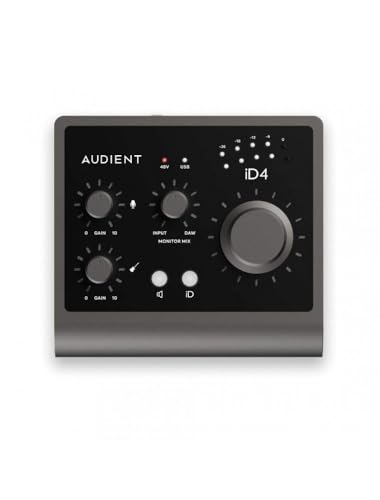
Audient iD4 MkII
Console-derived preamplifiers with the gain a low-output dynamic microphone actually needs.
- High-gain preamplifiers with a low noise floor
- Excellent headphone output for monitoring
- Solid metal body with a proper monitor control
- Only one microphone input
- Costs more than the obvious entry options
 (opens Amazon in a new tab)
 - Band
- $$ Mid tier
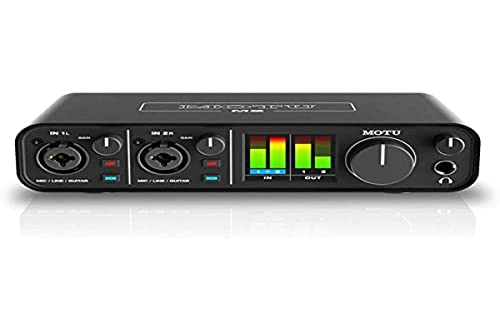
MOTU M2
Two inputs, very low latency, and metering you can actually read from across the desk.
- Full-colour metering shows levels at a glance
- Notably low round-trip latency
- Two combination inputs with clean preamplifiers
- Gain is adequate rather than generous for low-output dynamics
- Plastic ends on an otherwise metal body
 (opens Amazon in a new tab)
 - Band
- $$ Mid tier
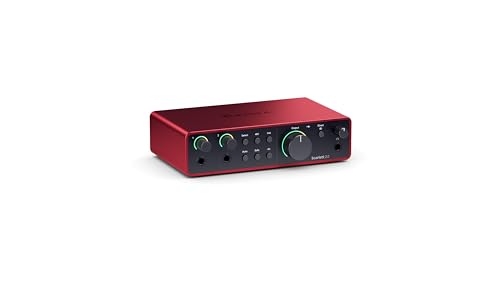
Focusrite Scarlett 2i2
The default two-input interface, with a switch that solves the low-gain microphone problem.
- Extra gain mode for low-output microphones
- Two inputs for a co-host or an instrument
- Very well supported on every platform
- Latency is fine rather than exceptional
- Headphone output is merely adequate
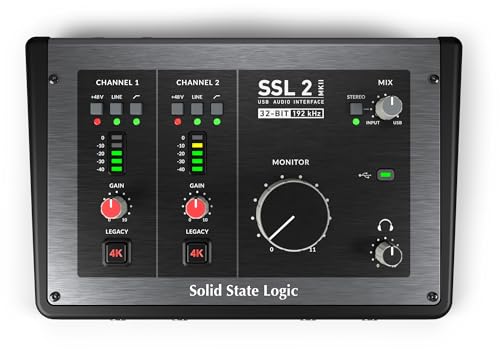 (opens Amazon in a new tab)
 - Band
- $$$ Upper-mid tier
Solid State Logic SSL 2
The one with a character switch that flatters a voice, if you want colour rather than neutrality.
- Switchable analogue character on each input
- Generous gain range for demanding microphones
- Genuinely well-built and pleasant to use
- Character switch bakes a decision into the recording
- Costs meaningfully more than the default choice
Questions people ask
How much gain do I need?
It depends entirely on the microphone, which is why this is a matching question rather than a specification to maximise. Condensers produce plenty of signal and work with anything. Broadcast dynamic microphones produce very little, and paired with an ordinary interface at maximum you get a usable level accompanied by the interface own hiss. If a low-output dynamic is in your plan, look for an interface that advertises high-gain preamplifiers, or budget for an inline booster.
Does the interface affect sound quality?
Less than people expect at the top of the signal chain and more than they expect at the bottom. Converters in even inexpensive modern interfaces are far better than the room and the microphone in front of them, so that part rarely limits anything. The preamplifier is where it matters: a noisy preamplifier pushed hard adds hiss you cannot remove, and that is exactly what happens when a quiet microphone meets a weak preamplifier.
Do I need two inputs?
Only if two sources will be live at the same time, and it is worth being honest about whether that is a real plan or a hypothetical one. Two inputs let you record a co-host or an instrument onto a separate track, which is enormously easier to edit than two people on one. If you are one person talking to a computer, the second input is dead weight, and the money is better spent on gain quality or on the microphone.
Audient iD4 MkII
Console-derived preamplifiers with the gain a low-output dynamic microphone actually needs.