
We have not tested these products. This comparison is reasoned from manufacturer specifications, documentation and warranty terms. How we test
If you buy through a link on this page we may earn a commission. Retailers do not pay for reviews or placement. Prices are shown as bands, never as figures — the live price is at the retailer. As an Amazon Associate I earn from qualifying purchases. How we make money
On this page
Four decisions, and the second one is the only one people get wrong expensively.
1. How many inputs
One if you are one person. Two if a co-host or an instrument will be live at the same time. More than two is a band, not a desk.
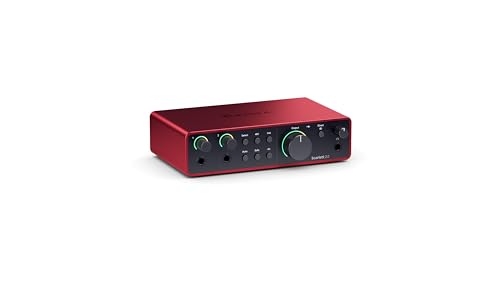
Two inputs record two sources onto separate tracks, which makes editing dramatically easier than untangling two people from one. The Focusrite Scarlett 2i2 (at Amazon, opens in a new tab) is the default for that job.
If you are weighing a mixer instead, the two approaches compared is the shorter answer than this guide.
2. Gain
The decision that matters. Condensers produce plenty of signal. Broadcast dynamics produce very little, and an interface without high-gain preamplifiers will deliver level plus hiss.
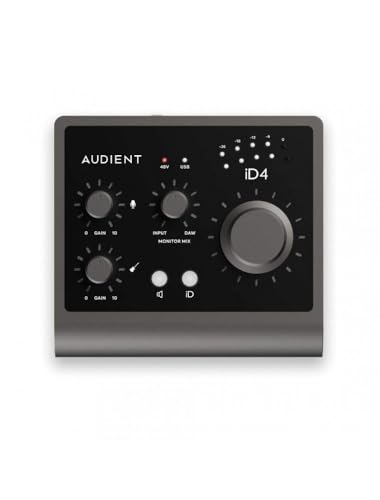
This is a compatibility question, not a quality ranking. Check the pair; our interface recommendations are built around the same question. Where a low-output dynamic is the plan, the Audient iD4 MkII (at Amazon, opens in a new tab) is the pick built around that pairing.
3. Monitoring
Direct monitoring, which routes your input straight to the headphone socket without the computer, is what makes recording feel natural. Nearly everything has it; confirm rather than assume.
Then look at the headphone output itself, particularly if you own high-impedance headphones.
4. Connection and support
USB for anything this site covers. Then check how long the manufacturer has supported previous products, because an interface with abandoned drivers becomes a paperweight at the next operating system update.
How we assessed these
This guide rests on published gain ranges and noise specifications, connectivity, monitoring facilities and manufacturer support records. Nothing was measured or recorded through here.
What we recommend
 (opens Amazon in a new tab)
 - Band
- $$ Mid tier
Focusrite Scarlett 2i2
Two inputs, enough gain for most microphones, and support that outlasts the hardware.
- Two inputs recorded to separate tracks
- Extra gain mode for quieter microphones
- Long-running driver and firmware support
- Headphone output is functional rather than good
- Latency is unexceptional
 (opens Amazon in a new tab)
 - Band
- $$$ Upper-mid tier
Audient iD4 MkII
Buy this if a broadcast dynamic is the microphone and you want no gain problems at all.
- Generous, quiet gain for low-output microphones
- Headphone output good enough for real monitoring
- Metal build with proper monitor control
- Single microphone input only
- Priced above the obvious default
Questions people ask
What does a combination input accept?
A socket that takes either a balanced microphone connector or a quarter-inch jack in the same hole, which covers microphones, instruments and line-level sources without adapters. Most interfaces use them because it removes a decision from the buyer. What still matters is what the input is set to expect: instrument inputs have a much higher impedance than microphone inputs, and plugging a guitar into an input configured for line level produces a thin, weak sound.
Do I need special drivers?
On macOS and iOS, almost never: class-compliant interfaces work as soon as they are connected. On Windows, a manufacturer driver is usually worth installing because it provides lower-latency operation than the generic system path, and low latency is what makes monitoring through the computer feel natural. Established manufacturers maintain these for many years, which is a genuine argument for buying from one rather than from an unknown brand.
Should I get a USB or Thunderbolt interface?
USB, for essentially every use this site covers. Thunderbolt offers lower latency and much higher channel counts, both of which matter when you are recording a full band across many inputs at once. For one or two voices, the difference in latency is smaller than what direct monitoring already solves for free, and the interfaces cost considerably more while being compatible with fewer machines.